What you'll learn
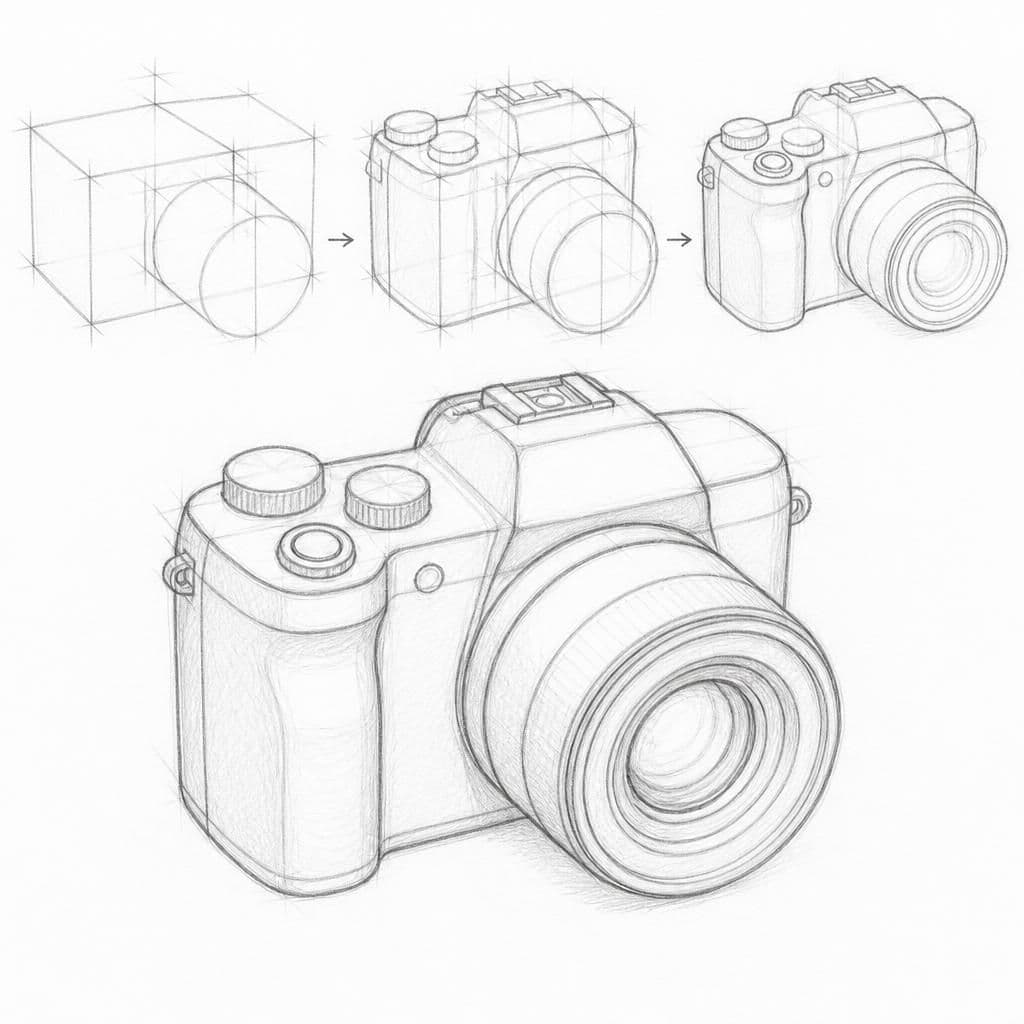
Drawing a digital camera is an excellent way to practice proportion and volume, as it involves capturing both geometric shapes and subtle curves. Understanding the size relationships between the lens, body, and buttons will enhance your ability to render objects realistically.
What you'll need
Step-by-step: how to draw digital camera
Begin by sketching a rough outline of the camera's body, capturing the overall rectangular shape.
Identify the lens, draw it as a slightly off-center circle, and ensure that its size is proportional to the body.
Add the viewfinder and display screen on the back, aligning them with the main body.
Draw the camera's buttons and dials, focusing on their placement and relative sizes.
Refine your sketch, enhancing the lines and adding any missing details, such as texture or light reflections.
Before you start: what to look at
Notice the slight curves on the camera body edges. Pay attention to the lens's roundness and how it protrudes. Observe how light lands on the camera's buttons, highlighting their contours.
Pro tips for drawing digital camera
Common mistakes drawing digital camera
Self-evaluation checklist
Check if the lens is proportional to the body and if the overall shape feels balanced. Ensure the volume is conveyed by how elements are distributed in space.
Frequently asked questions
How can I accurately capture the roundness of the lens?
Visualize the lens as a cylinder and draw light guiding lines to maintain its curvature before adding details.
What if I can't get the proportions right initially?
Use a light pencil and sketch multiple iterations. Compare the lens to the body frequently and adjust as needed.
How do I make the camera look three-dimensional?
Focus on shading and highlights where light hits the camera. This can help convey depth and volume effectively.
More drawing lessons
Get a new drawing lesson delivered to your inbox every morning, free.
Subscribe to Draw Daily →